Most pricing pages fail in the same way.
They do not lack information. They lack hierarchy.
The user arrives with one question: Which plan is for me?
A weak pricing page answers with spreadsheets, checkmarks, and edge cases. A strong one answers with a value ladder: who each tier is for, why the next tier exists, and which rung most buyers should choose.
That is the lens here.
Linear's pricing page understands the job. Notion's mostly does not.
Both are strong products. Both serve modern software teams. Both have enough product complexity to justify multiple plans. But only one of these pages makes the buying decision feel simple.
Linear makes the ladder legible.
Notion makes the ladder crowded.
The screens being compared
Before the teardown, here is the actual surface area. Both pages are doing the same job above the fold: orient the buyer, present the ladder, and make the next click feel safe.
The test
A pricing page should make four things clear above the fold:
- What kind of buyer this product is for
- What changes as you move up the ladder
- Which plan is the default choice for most teams
- When to stop comparing and click
If a visitor has to study the page to understand its packaging, the page is underperforming.
This matters because pricing friction is not a copy problem in isolation. It is a conversion problem. Confused buyers delay. Delayed buyers bounce. And the longer someone stares at a pricing grid, the more likely they are to start inventing reasons not to buy.
What Linear gets right
Linear's pricing page is calm.
That sounds cosmetic. It is not.
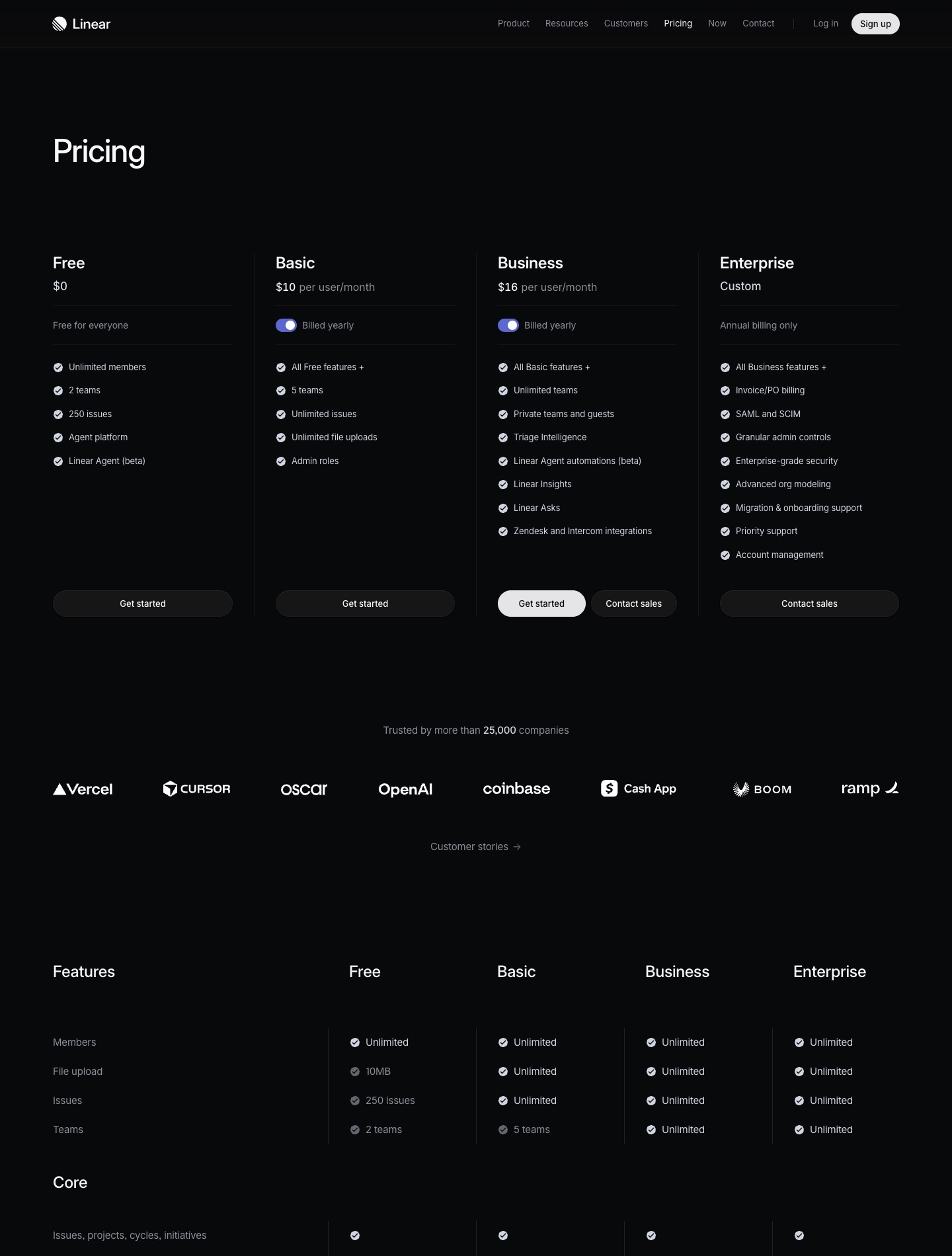
The page opens with a simple promise: Pricing. Then it immediately presents four plans in a clean sequence: Free, Basic, Business, Enterprise. The structure does most of the persuasion.
Here is what works.
1. The ladder is sequential, not argumentative
Linear does not ask the visitor to decode the entire product before understanding the plans.
Each tier builds cleanly on the one below it:
- Free: try it, small scale, low commitment
- Basic: unlock the limits that serious teams will hit first
- Business: intelligence, scale, reporting, deeper integrations
- Enterprise: security, control, procurement, support
That is a real ladder. Capacity first. Then sophistication. Then governance.
You can disagree with the pricing. You cannot really misunderstand the packaging.
2. The default path is obvious even without a giant badge
Linear's Business tier reads like the real target plan for a growing company.
It includes the features that feel meaningfully more advanced, not just administratively larger: Triage Intelligence, Insights, Asks, deeper integrations. It feels like the plan where the product becomes strategically useful, not merely less restricted.
That matters. The job of a pricing page is not to treat every tier equally. The job is to help the right tier win.
Linear understands that.
3. The page separates summary from proof
Above the fold, you get the packaging.
Lower down, you get the feature matrix.
That ordering is disciplined. It respects the fact that most buyers do not begin with a row-by-row audit. They begin with orientation. Only after they understand the shape of the offer do they need the proof table.
A lot of pricing pages reverse that order and bury the decision under detail. Linear does not.
4. Enterprise is framed as a different buying motion
Enterprise is not pretending to be a normal self-serve tier.
It is custom. Annual. Security-heavy. Support-heavy. Procurement-aware.
That sounds obvious, but many SaaS companies still present enterprise pricing as if it belongs in the same decision mode as the lower plans. It does not. It is a different sale. Linear treats it like one.
Where Notion loses the thread
Notion's pricing page is not bad because it is comprehensive.
It is bad in the specific way many successful product companies become bad at pricing pages: it tries to explain too many product truths at once.
The result is a ladder with blurry rungs.
1. The headline sells the product, not the plan logic
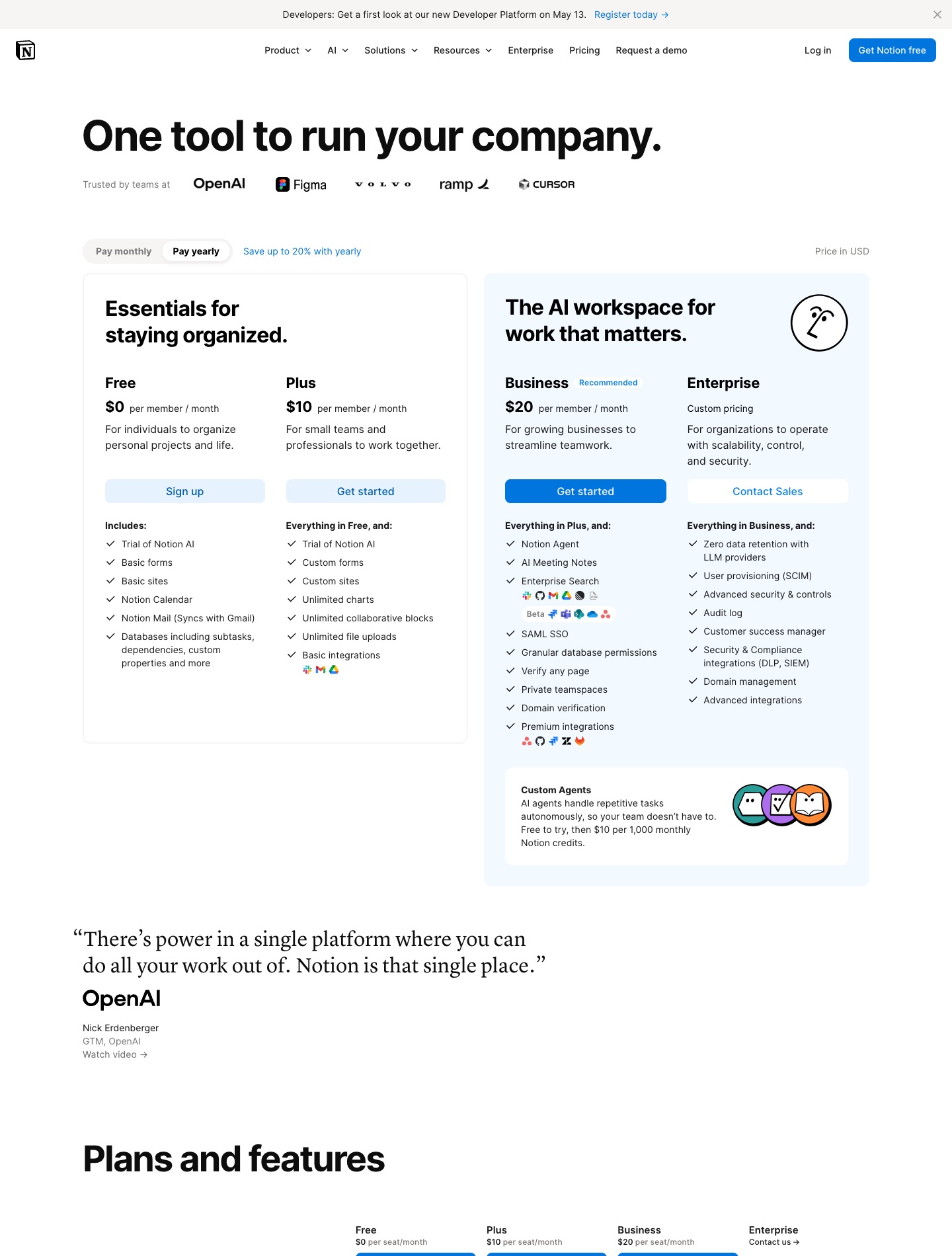
Notion leads with: One tool to run your company.
That is brand positioning, not pricing orientation.
It tells me what Notion wants to be. It does not tell me how the plans are divided or which one is for me.
Linear's opening structure says: here are the tiers. Notion's opening structure says: here is our ambition.
Ambition is useful. Not at the moment of plan selection.
2. The page tries to sell two ladders at once
Notion is no longer just a workspace product. It is also selling AI workspace behavior, AI search, AI meeting notes, Notion Agent, custom agents, and a separate credit economy.
That creates a packaging problem.
Instead of one clean ladder, the page now contains:
- a collaboration software ladder
- an AI capability ladder
- a usage-based AI credit model layered on top
Those may all be valid business decisions. They are still a confusing page experience when presented together without stronger framing.
A buyer trying to choose between Plus and Business should not also have to parse a separate AI consumption model in the same breath.
3. Business is marked recommended, but the reason is fuzzy
Notion labels Business as recommended.
Fine.
But a recommendation only works if the user immediately understands why that tier is the center of gravity.
In Notion's current structure, Business inherits a long list of features, many of which read as administrative or technical rather than outcome-based. SAML SSO, granular permissions, premium integrations, domain verification. Important, yes. But the story of the tier is not sharply framed.
For whom does this plan become necessary? What pain appears one step below it? What job does it unlock?
The page answers with features. It does not answer with decision logic.
4. The comparison table arrives as a tax
Notion's feature table is dense, and density changes behavior.
Once users hit a wide matrix full of limits, beta labels, AI caveats, and plan-by-plan exceptions, they stop feeling guided and start feeling responsible for not making a mistake.
That is the opposite of what a good pricing page should do.
The table should confirm a decision the page has already helped you make. It should not be the decision.
5. The offer boundary is messy
There is a core subscription. There are AI trials. There are Notion credits. There are custom agents. There are custom domains that appear to be pay-per-domain on paid plans.
Again: each of these may make sense commercially.
But together they create the feeling that the real price is slightly off-screen.
That is dangerous.
People do not need a pricing page to be cheap. They need it to feel legible.
The real difference
Linear packages its complexity.
Notion exposes its complexity.
That is the whole argument.
When a product matures, the temptation is to keep adding packaging layers until the pricing page reflects the full truth of the business. But the buyer does not need the full truth all at once. The buyer needs the shortest accurate path to a confident choice.
Linear protects that path.
Notion weakens it.
What I would change if I were Notion
I would redesign the pricing page around one sentence:
Pick the plan that matches your team's operating complexity.
Then I would rebuild the ladder around that idea.
Proposed structure
Free
For individuals and early experimentation
Plus
For small teams replacing docs and lightweight project tools
Business
For cross-functional companies standardizing work in one system
Enterprise
For large organizations with security, compliance, and governance requirements
That is the strategic version.
Then I would make four structural changes.
1. Split core subscription pricing from AI usage pricing
Do not force the visitor to understand seats and AI credits in the same decision block.
Sell the workspace first. Explain AI usage second.
The current blend makes the offer feel less trustworthy than it probably is.
2. Rewrite each tier around the pain it resolves
Notion's plans are currently feature-described. They should be escalation-described.
Example:
- Plus: when your team needs unlimited collaboration and fewer limits
- Business: when permissions, search, and private spaces become operational needs
- Enterprise: when governance and security become buying criteria
That is how buyers think.
3. Cut the first screen in half
The first screen should show:
- concise plan labels
- one-line audience descriptors
- one highlighted default
- one primary CTA path
No sprawling matrix. No extra product story. No side economy.
Just the ladder.
4. Turn the matrix into validation, not discovery
Keep the full feature table below. It is useful for serious buyers.
But restructure the page so that most users arrive at the table with a likely choice already in mind.
If the table is doing first-contact explanation, the page has waited too long to clarify the offer.
The rebuilt page
The mockup should not stay theoretical, so I turned the redesign into a live page.
Open the rebuilt page on its own.
Why this matters beyond Notion
This is not really a post about Notion.
It is a post about a common growth-stage mistake.
As products expand, companies get better at building features and worse at packaging them. Every internal team gets its line item. Every capability earns a row. Every exception survives because someone can justify it.
The page becomes accurate and less persuasive at the same time.
Pricing pages are where product strategy becomes visible.
If the pricing ladder is sharp, it usually means the company knows which customers it wants, what maturity stages it serves, and where monetization actually begins.
If the pricing ladder is muddy, the product may still be excellent. But the go-to-market story has started to sprawl.
Linear looks like a company that knows where the center of gravity is.
Notion looks like a company trying to present the entire surface area of its ambition in one place.
That is the difference.